Error Grouping
When the same error occurs multiple times, Anvil groups them together so you can focus on fixing unique issues rather than drowning in duplicates.
Occurrences
Each time an error with the same fingerprint is thrown, Anvil records it as a new occurrence within the existing error group. When you open an error from the Errors page, you see the most recent occurrence by default.
To see all occurrences of a given error, click the View More Occurrences button on the error detail page. This shows a list of every time this error was thrown, with timestamps, driver versions, and error messages for each.
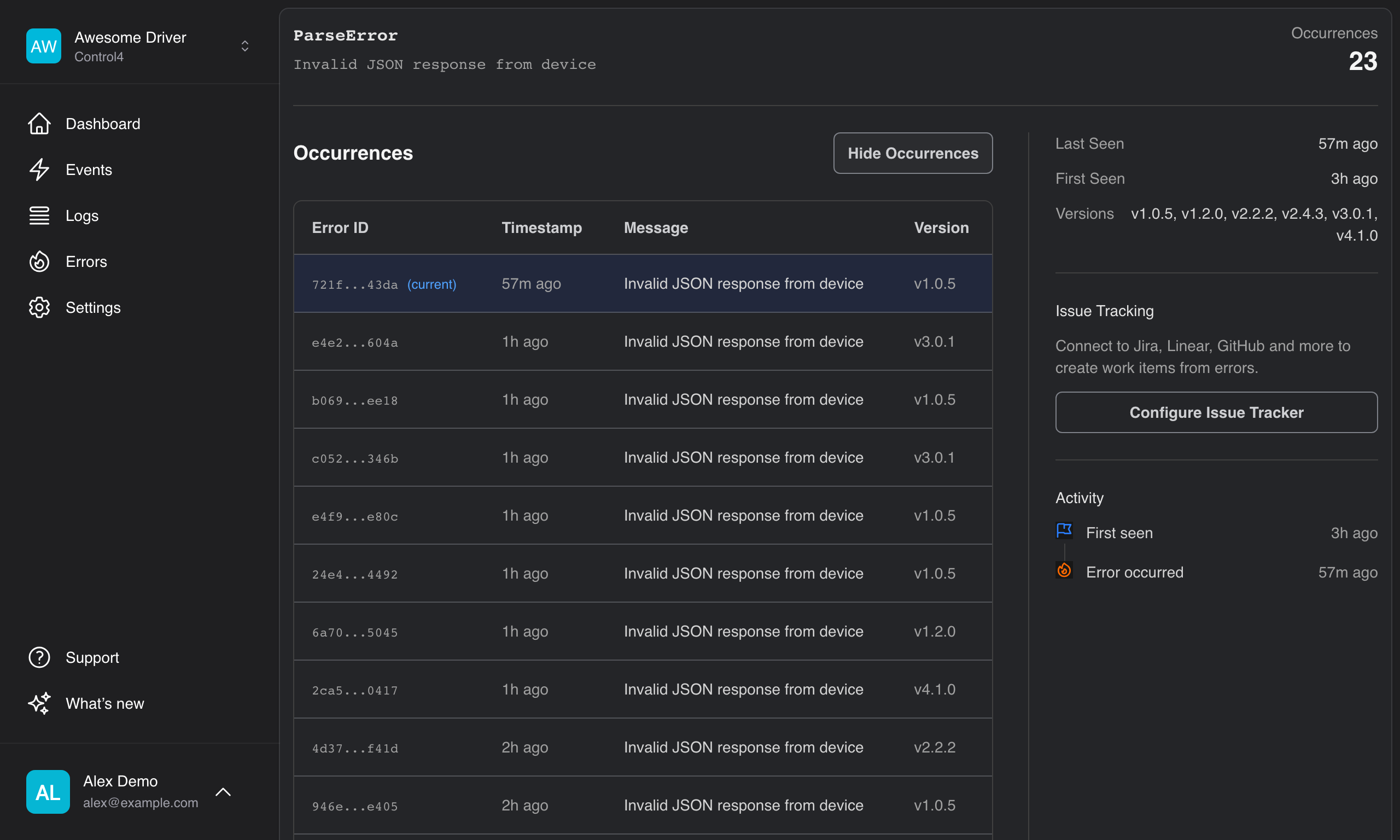
Selecting a specific occurrence takes you to the detail page for that individual occurrence — useful for comparing context, arguments, or driver versions across different instances of the same error.
You can also navigate between occurrences using the Previous / Next buttons on the detail page without returning to the list.
How Grouping Works
Anvil creates a fingerprint for each error based on its characteristics. Errors with the same fingerprint are grouped together into a single entry on the Errors page, with a count of how many times it occurred.
Fingerprinting Strategy
Anvil uses exception stacktrace grouping which considers all frames in the call stack:
| Component | Description |
|---|---|
| Error type | The category of error (e.g. LuaError, RuntimeError) |
| Error message | The error text, normalised to remove variable data |
| Stack frames | All frames in the call stack, including file names and line numbers |
Two errors are grouped together when they have the same error type, originate from the same location in your code, and have the same call path leading to the error.
Example
These two errors would be grouped together — same type, same location, same call path:
ERROR: attempt to index nil value (local 'device')
  driver.lua:142: in function 'handleInput'
  driver.lua:89: in function <ReceivedFromProxy>
But this error would create a separate group because it originates from a different line:
ERROR: attempt to index nil value (local 'device')
  driver.lua:156: in function 'handleOutput'
  driver.lua:92: in function <ReceivedFromProxy>
Viewing Grouping Data
On any error detail page, expand the Grouping Info section to see:
- Grouped by — the strategy used (currently "exception stacktrace - all frames")
- Hash — the unique SHA-256 fingerprint for this error group
- Raw grouping data — toggle to see the exact data used to generate the fingerprint
The Fingerprint Hash
Each error group has a unique hash. This is useful for:
- Referencing specific issues in bug reports or tickets
- Tracking recurrence — if a previously fixed bug returns, it'll have the same fingerprint
- API integrations that need to identify specific error types